
Go Large with Freecharge. Merchant Onboarding is now OPEN!





Overview
Introduction
FCPG provides a secure and flexible set of REST-based APIs that enable seamless online payment processing for your website or application. These APIs are designed to be simple, consistent, and developer-friendly, making integration quick and easy.
By connecting your platform directly to FCPG, you can offer your customers multiple payment options, including:
- Credit cards
- Debit cards
- Net banking
- Wallets
- UPI
FCPG ensures a reliable and secure payment experience, supporting real-time authorization, confirmation, and reconciliation.
In addition to API access, FCPG also offers an online Merchant Portal, where you can:
- View and download Transactions
- View and download Settlements
- Initiate refunds
- Manage your merchant profile and webhook configurations
You can log in to the Merchant Portal using the username and password provided during your onboarding.
For development and testing, FCPG also provides sandbox (test) credentials that allow you to simulate transactions before going live.These sandbox credentials will be shared by your KAM post onboarding.
High-Level Integration Flow
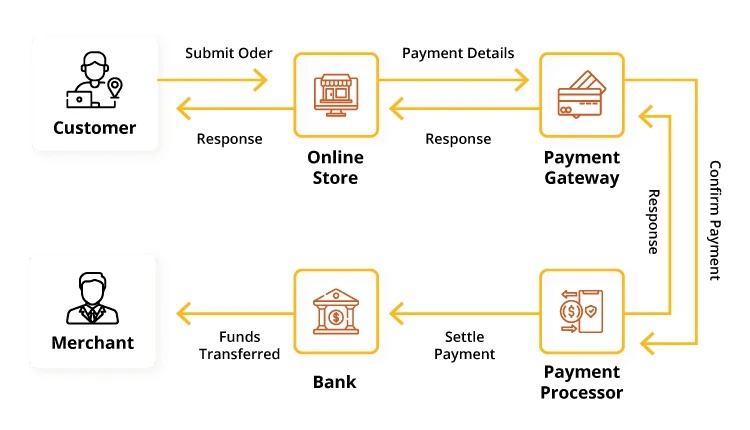
To use FCPG Checkout, merchants need to integrate the FCPG payment gateway into their website. Once integrated, customers can selects products/services and clicks Pay Now on your checkout page. When they click the Pay Now, they will be redirected to a FCPG checkout Page where they will complete the payment process.
Once the payment is processed, the customer will be redirected back to the merchant's website where they can view the payment result.
How It Works
- Customer Initiates Payment
- The customer selects products/services and clicks Pay Now on your checkout page.
- Redirect to FCPG Payment Page
- Your website redirects the customer to the secure FCPG payment page, where they choose a payment mode (Credit Card, Debit Card, Net Banking, or UPI) and enter details.
- Payment Processing
- FCPG communicates with the respective bank or payment network to process the transaction.
- Redirection to Merchant Website
- Once the payment is completed, the customer is redirected back to your website along with the appropirate transaction status.
- Display Payment Result
- Your website displays the payment confirmation message and updates the order status accordingly.
Integration Checklist
-
Onboarding: Obtain Merchant ID (MID), Secret Key.
-
Encryption Keys: Generate your Public/Private Key pair for payload encryption and share with FCPG team for the configuration.
Security Protocol
FCPG uses a robust "Sign then Encrypt" approach for all API payloads.
- Signature:
- Construct a string of all parameters sorted alphabetically.
- Append your Secret Key.
- Generate a SHA-256 hash.
- Add this hash as the signature field in your JSON payload.
- Encryption:
- Algorithm: AES-256
- The entire JSON payload (including the signature) is encrypted into a single string called encData.
Note: See for implementation details.
Developer Panel Assistant
Helping you integrate faster. Suggested questions are below to help you get started
Download Enterprise App

Follow Us


© Freecharge Payment Technologies Pvt. Ltd. All Rights Reserved
